

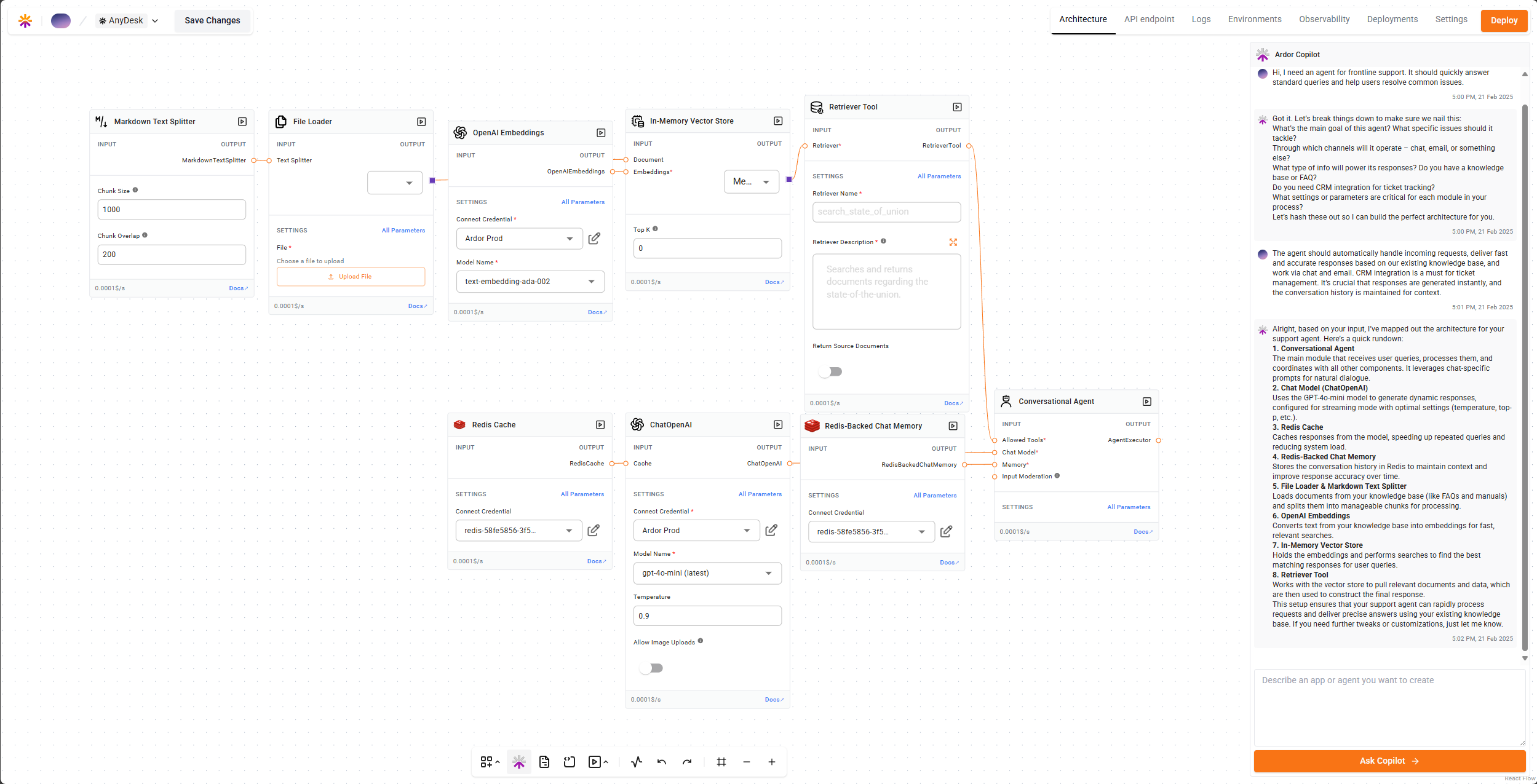
What is Cerebrum?
Cerebrum is Ardor’s built-in AI copilot that guides you through the entire development lifecycle. Whether you’re a vibe coder with an idea or an experienced developer looking to accelerate delivery, Cerebrum adapts to your needs.To open Cerebrum, click on the “Copilot” button in the Canvas toolbar.
Key Capabilities
Model Selection
Choose from Gemini 3 Pro, Gemini 3.1 Pro, GPT-5.2, Claude Opus 4.6, Claude Sonnet 4.6, and Grok 4.1
Context Summarization
Smart context management for long development sessions
Spec-Driven Development
Cerebrum follows a structured approach to building your applications:- Understanding Requirements - When you describe your idea, Cerebrum asks clarifying questions to fully understand what you need
- PRD Generation - Creates a Product Requirements Document based on your answers
- Test Cases - Generates test cases from the PRD to ensure quality
- Implementation - Builds your solution following TDD (Test-Driven Development) best practices
Build Any Application
Cerebrum can help you create:- Agentic Applications - AI-powered apps with LLM orchestration
- Web Applications - Frontend and backend services
- APIs and Services - RESTful APIs, microservices
- Data Pipelines - ETL processes, ML training pipelines
- Databases - Set up and configure PostgreSQL, MongoDB, Redis, and more
Microservices Architecture
Each element Cerebrum creates is a proper microservice:- Stateful or Stateless - Choose the right type for each service
- Any Language - Python, JavaScript, Go, or any language you prefer
- Any Container - Use public Docker images or let Cerebrum create Dockerfiles
- Connected Services - Cerebrum automatically configures environment variables and connections between services
Code Sources
Cerebrum can work with code from multiple sources:- Write on Platform - Create and edit code directly in Ardor
- GitHub Integration - Pull code from your repositories
- Docker Images - Use any public Docker image
Working with Cerebrum
Starting a New Project
- Open the Canvas and click the “Copilot” button
- Describe what you want to build in natural language
- Answer Cerebrum’s clarifying questions
- Review the generated PRD and test cases
- Let Cerebrum build and deploy your solution
Example Prompts
Agentic App
“Build a customer support chatbot that can answer questions about our product documentation”
Web App
“Create a todo app with user authentication and a PostgreSQL database”
API Service
“Build a REST API for managing inventory with CRUD operations”
Data Pipeline
“Set up a pipeline that fetches data from an API and stores it in a database”
Iterating on Your Solution
Cerebrum maintains context throughout your session:- Ask for changes to existing services
- Add new features or services
- Fix bugs by describing the issue
- Refactor code for better performance
Multi-Environment Support
Cerebrum can create and manage multiple environments:- Development - For building and testing
- Staging - For pre-production validation
- Production - For live deployments
- Create a new environment to test fixes
- Apply changes without affecting production
- Promote working solutions to production
Monitoring and Operations
Cerebrum has access to your solution’s operational data:- Logs - View and analyze service logs
- Metrics - Monitor CPU, RAM, storage, and requests
- Debugging - Analyze errors and suggest fixes
- Auto-repair - Automatically fix issues and redeploy
Cerebrum can look at logs, understand the problem, create a fix, deploy to a test environment, verify the fix works, and then apply it to production - all automatically.
Best Practices
Be Specific
Be Specific
The more details you provide, the better Cerebrum can understand your requirements. Include information about expected users, data formats, and integration needs.
Review the PRD
Review the PRD
Before Cerebrum starts building, review the generated PRD to ensure it matches your expectations. You can ask for changes at this stage.
Use Environments
Use Environments
Take advantage of multiple environments to safely test changes before deploying to production.
Iterate
Iterate
Don’t try to describe everything at once. Start with core functionality and iterate with Cerebrum to add features.
Getting Started
Try Cerebrum Now
Sign up for Ardor Cloud and start building with Cerebrum today. No credit card required for the free tier.