

Overview
Create a service from scratch when you want complete control over your codebase. Start with an empty project, write your code, and define exactly how your application builds and runs.When to use this: Building custom applications, APIs, or services where you want to write all the code yourself or have Cerebrum help you build from a blank slate.
Why Start Empty
Full control
You decide everything — language, framework, dependencies, and architecture.
Clean slate
No legacy code or opinions. Build exactly what you need.
Cerebrum-powered
Let Cerebrum write your code, or do it yourself. Your choice.
Any language
Python, Node.js, Go, Rust, Java — anything that runs in a container.
Before You Start
You'll need a Dockerfile
You'll need a Dockerfile
Empty services require a
Dockerfile in the project root to deploy. The dev container works without one, but deployments need it.Know your stack
Know your stack
Decide on your programming language and framework before starting. This helps Cerebrum assist you more effectively.
Dev container available immediately
Dev container available immediately
The development container starts right away with a terminal. You can install dependencies and run code before writing a Dockerfile.
Export to GitHub later
Export to GitHub later
You can always connect your service to GitHub later to enable version control and local development.
How to create
- 1. Add Service
- 2. Service Created
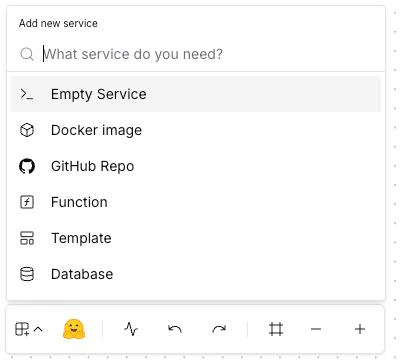
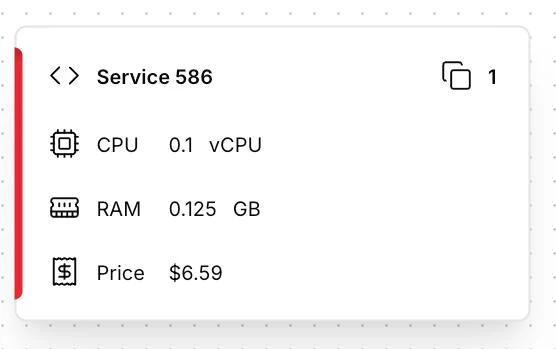
Project Structure
An empty service should start with a minimal structure. Here’s how to organize your code:- Python
- Node.js
- Go
Adding Your First Code
Step 1: Open the Code Editor
Click Code Editor in the toolbar to access your project files. Create your main application file.Step 2: Write Your Application
Here’s a minimal “Hello World” for common languages:- Python (Flask)
- Node.js (Express)
- Go
app.pyrequirements.txt
Dockerfile Setup
Create aDockerfile in your project root for deployments:
- Python
- Node.js
- Go
Dockerfile Requirements
Your Dockerfile must:
- EXPOSE the port your app listens on
- CMD or ENTRYPOINT to start your application
- Read
PORTfrom environment variable for flexibility
Best Practices
Start with the dev container
Start with the dev container
Use the terminal to prototype and test before writing the Dockerfile. It’s faster for iteration.
Use environment variables
Use environment variables
Never hardcode configuration. Use
os.environ (Python), process.env (Node.js), or os.Getenv (Go).Keep images small
Keep images small
Use slim/alpine base images. Multi-stage builds reduce final image size significantly.
Pin dependency versions
Pin dependency versions
Lock versions in
requirements.txt, package-lock.json, or go.sum for reproducible builds.Add health checks
Add health checks
Implement a
/health endpoint for monitoring. Ardor uses this to verify your service is running.Troubleshooting
Dockerfile not found
Dockerfile not found
Cause: Missing
Dockerfile in project root.Solution: Create a Dockerfile (case-sensitive) in the root directory, not in a subdirectory.Build fails with dependency errors
Build fails with dependency errors
Cause: Missing or incompatible dependencies.Solution:
- Verify your dependency file exists (
requirements.txt,package.json, etc.) - Test dependency installation in the dev container first
- Check for version conflicts
App not accessible after deploy
App not accessible after deploy
Cause: Port mismatch or binding to localhost.Solution:
- Ensure your app reads the
PORTenvironment variable - Bind to
0.0.0.0, notlocalhost - Verify the
EXPOSEport matches your app’s port
Changes not reflecting in dev container
Changes not reflecting in dev container
Cause: Need to restart the container or app.Solution:
- For code changes: Restart your app process
- For dependency changes: Restart the dev container
- Some frameworks support hot reload — configure them for faster iteration
What’s Next
Connect to GitHub
Version control your code and enable local development with your IDE
Add Environment Variables
Configure secrets and environment-specific settings
Networking
Configure public/private access and connect to other services
Variables & Secrets
Store API keys, passwords, and configuration securely