> ## Documentation Index
> Fetch the complete documentation index at: https://docs.ardor.cloud/llms.txt
> Use this file to discover all available pages before exploring further.
# Solution
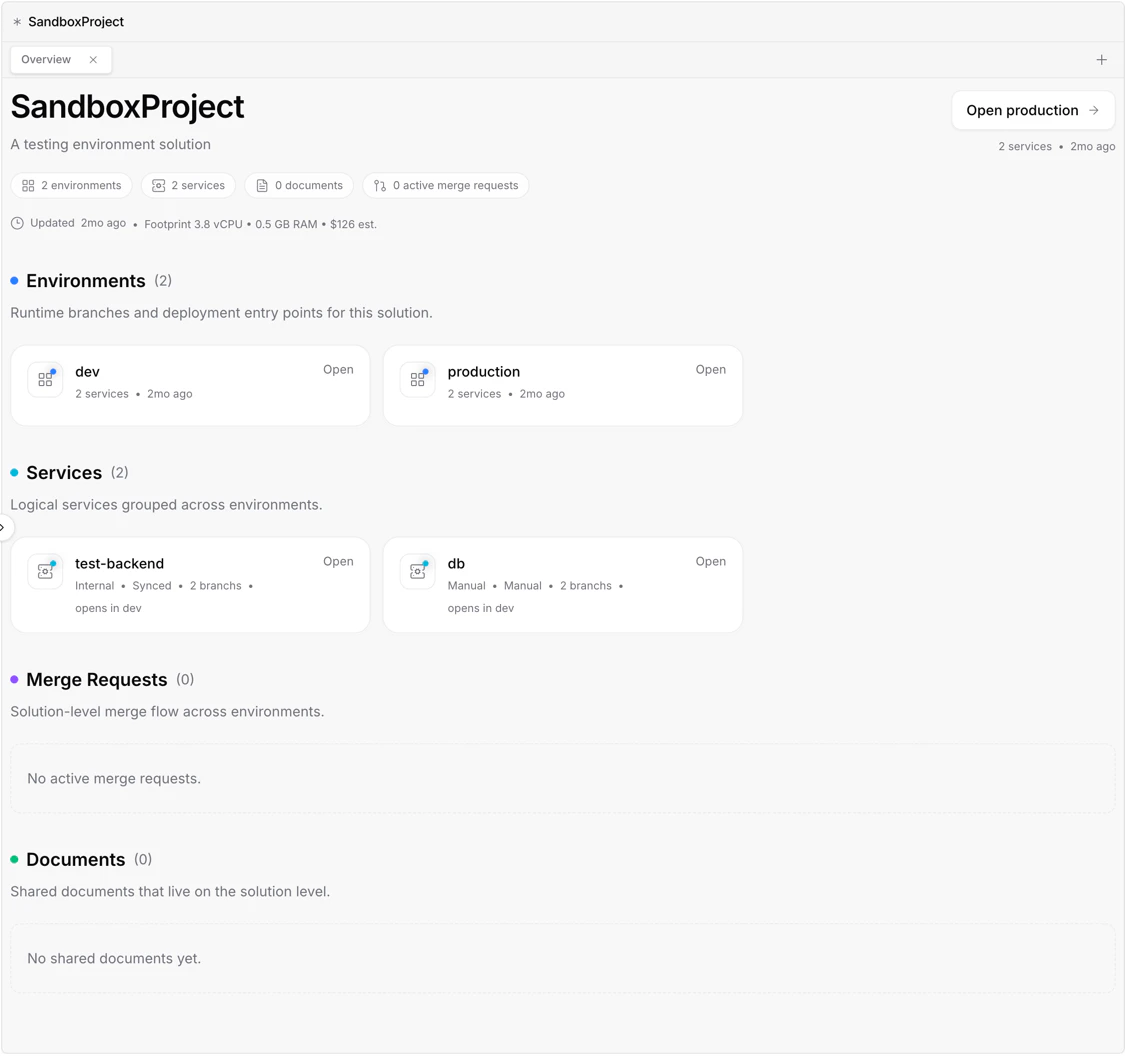
> A solution is like a project in Ardor: it brings services, environments, and documents together in one place.
 ## Overview
A solution is the main project container in Ardor. It represents one product, application or prototype and keeps everything related to that work together.
Inside a solution, you can organize services, environments, and documents as one connected workspace. Services define what runs, environments define where it runs, and documents keep the product context, plans, and notes close to the work.
**Cerebrum can set up a solution with you.** Describe the product or prototype you want to build, and Cerebrum can help create the right services, environments, documents, and configuration.
## What's Included
Application code, APIs, workers, databases, caches, and other runtime components that make up your project.
Isolated copies of the solution, such as dev, staging, production, or feature environments.
Product notes, requirements, plans, and other project materials connected to the solution.
Variables, secrets, domains, networking, and other settings shared across the project.
## How It Fits Together
Think of a solution as the project boundary:
| Part | Role |
| ------------ | ----------------------------------------------- |
| Services | What the project runs |
| Environments | Where each copy of the project runs |
| Documents | Why the project exists and how it should evolve |
This keeps the technical resources and product context in one place, so you can move between planning, building, deploying, and iterating without losing the thread.
## When to Create a New Solution
Create a separate solution when you want a clean project boundary.
Good examples include:
* A new product or app
* A customer-specific implementation
* A major experiment with its own lifecycle
For smaller feature work inside the same application, create a new environment instead of a new solution.
## What's Next
Create isolated environments for development, staging, and production
Keep product context, plans, and notes inside the solution
## Overview
A solution is the main project container in Ardor. It represents one product, application or prototype and keeps everything related to that work together.
Inside a solution, you can organize services, environments, and documents as one connected workspace. Services define what runs, environments define where it runs, and documents keep the product context, plans, and notes close to the work.
**Cerebrum can set up a solution with you.** Describe the product or prototype you want to build, and Cerebrum can help create the right services, environments, documents, and configuration.
## What's Included
Application code, APIs, workers, databases, caches, and other runtime components that make up your project.
Isolated copies of the solution, such as dev, staging, production, or feature environments.
Product notes, requirements, plans, and other project materials connected to the solution.
Variables, secrets, domains, networking, and other settings shared across the project.
## How It Fits Together
Think of a solution as the project boundary:
| Part | Role |
| ------------ | ----------------------------------------------- |
| Services | What the project runs |
| Environments | Where each copy of the project runs |
| Documents | Why the project exists and how it should evolve |
This keeps the technical resources and product context in one place, so you can move between planning, building, deploying, and iterating without losing the thread.
## When to Create a New Solution
Create a separate solution when you want a clean project boundary.
Good examples include:
* A new product or app
* A customer-specific implementation
* A major experiment with its own lifecycle
For smaller feature work inside the same application, create a new environment instead of a new solution.
## What's Next
Create isolated environments for development, staging, and production
Keep product context, plans, and notes inside the solution