> ## Documentation Index
> Fetch the complete documentation index at: https://docs.ardor.cloud/llms.txt
> Use this file to discover all available pages before exploring further.
# Variables & Secrets
> Configure your services with environment variables and securely store sensitive data like API keys, passwords, and tokens.
## Overview
Every application needs configuration — API endpoints, feature flags, database passwords, third-party API keys. Variables & Secrets let you manage all of this without hardcoding values in your code.
**Cerebrum manages variables.** Just say "add the OpenAI API key" or "set DEBUG to true" — Cerebrum will configure it. The details below explain how variables and secrets work.
Plain text configuration visible in the UI. Use for non-sensitive settings like endpoints, flags, and paths.
Encrypted values hidden from view. Use for passwords, API keys, tokens, and anything sensitive.
Variables and Secrets are configured per service and injected as environment variables at runtime — both in dev containers and production deployments.
## Why Use Variables & Secrets
Never commit passwords or API keys to your repository. Store them securely in Ardor.
Same code, different configs. Switch between dev/staging/prod without changing code.
Change a value once in the UI — no redeployment needed for dev containers.
Share configuration without sharing actual secret values. Team members see masked data.
## Variables vs Secrets
| | Variables | Secrets |
| -------------- | ----------------------- | --------------------------------- |
| **Visibility** | Visible in UI | Masked (••••••••) |
| **Storage** | Plain text | Encrypted |
| **Use for** | Endpoints, flags, paths | Passwords, API keys, tokens |
| **Editable** | View and edit freely | Edit without seeing current value |
**Rule of thumb:** Passwords, API keys, tokens? Always a Secret. They're stored encrypted in Ardor and never touch your code — only references to them do. Your GitHub repo stays clean.
## System Variables
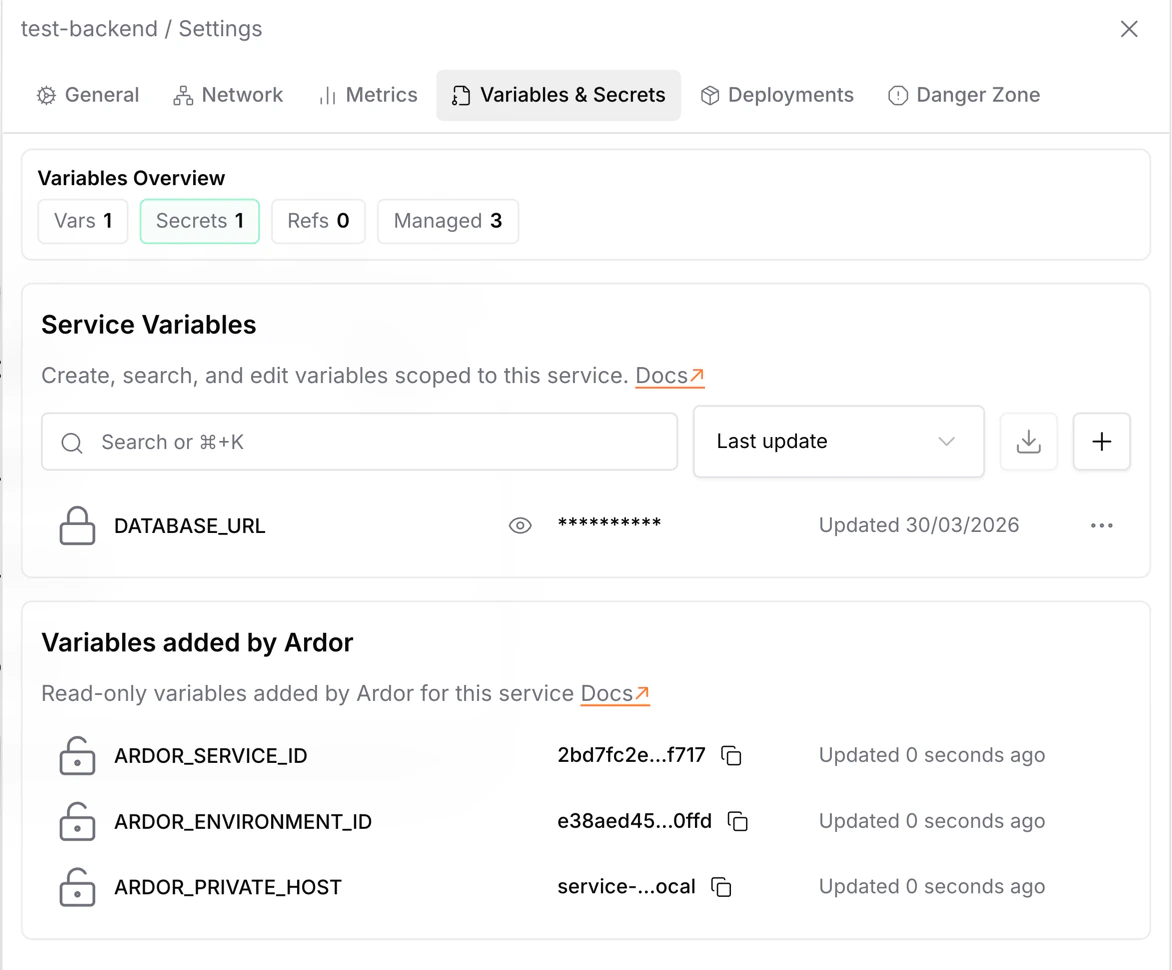
At runtime, Ardor may add system variables based on your service settings. These variables are managed by Ardor and cannot be edited or overridden from Variables & Secrets.
Common system variables include:
| Variable | Description |
| ---------------------- | ---------------------------------------------------------------- |
| `ARDOR_SERVICE_ID` | ID of the current service |
| `ARDOR_ENVIRONMENT_ID` | ID of the current environment |
| `ARDOR_PRIVATE_HOST` | Private hostname for reaching the service inside the environment |
System variables are injected automatically when they apply to the service. They may not all be present for every service configuration.
## Adding Variables & Secrets
Navigate to your service and open the **Variables & Secrets** section
Click **Add Variable** or **Add Secret**, enter a name and value
Changes apply to dev container immediately. For production, redeploy your service.
### Variable References
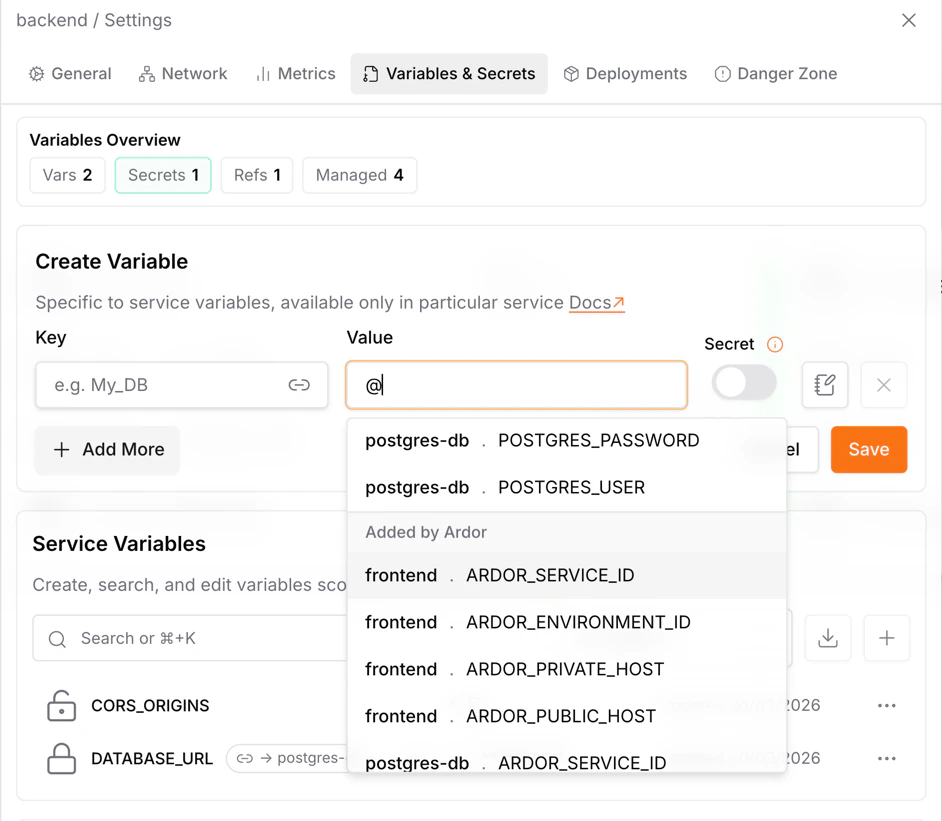
A variable or secret value can include references to variables from the current service or another service. Type `@` in the value field and select a variable from the list. Ardor inserts a reference token for you, including references to system variables such as `ARDOR_PRIVATE_HOST`.
You can also click to create a reference directly.
A single value can combine static text and multiple references. For example, a `DATABASE_URL` can be assembled from database credentials and the database service private host:
```text theme={null}
postgresql://{{ postgres-db.POSTGRES_USER }}:{{ postgres-db.POSTGRES_PASSWORD }}@{{ postgres-db.ARDOR_PRIVATE_HOST }}:5432/{{ postgres-db.POSTGRES_DB }}
```
References are resolved when Ardor injects environment variables at runtime, so the consuming service receives one final value.
### Naming Conventions
Environment variable names should be:
* **UPPERCASE** with underscores: `DATABASE_URL`, `API_KEY`, `DEBUG_MODE`
* Descriptive: `POSTGRES_PASSWORD` not `PW`
* Prefixed for clarity: `REDIS_HOST`, `REDIS_PORT`, `REDIS_PASSWORD`
Some names are reserved by the system (like `PORT`). Ardor will warn you if you try to use a reserved name.
## Common Use Cases
Connect to PostgreSQL, MySQL, or other databases:
| Variable | Type | Example |
| ------------------- | -------- | --------------------------- |
| `DATABASE_HOST` | Variable | `postgres-service.internal` |
| `DATABASE_PORT` | Variable | `5432` |
| `DATABASE_NAME` | Variable | `myapp` |
| `DATABASE_USER` | Variable | `admin` |
| `DATABASE_PASSWORD` | Secret | `••••••••` |
```python theme={null}
import os
db_url = f"postgresql://{os.environ['DATABASE_USER']}:{os.environ['DATABASE_PASSWORD']}@{os.environ['DATABASE_HOST']}:{os.environ['DATABASE_PORT']}/{os.environ['DATABASE_NAME']}"
```
Connect to OpenAI, Stripe, Twilio, etc:
| Variable | Type | Example |
| ----------------------- | -------- | ---------- |
| `OPENAI_API_KEY` | Secret | `••••••••` |
| `OPENAI_MODEL` | Variable | `gpt-4` |
| `STRIPE_SECRET_KEY` | Secret | `••••••••` |
| `STRIPE_WEBHOOK_SECRET` | Secret | `••••••••` |
```python theme={null}
import os
from openai import OpenAI
client = OpenAI(api_key=os.environ['OPENAI_API_KEY'])
```
Toggle features without code changes:
| Variable | Type | Example |
| ------------------ | -------- | ---------- |
| `DEBUG_MODE` | Variable | `true` |
| `ENABLE_ANALYTICS` | Variable | `false` |
| `MAX_UPLOAD_SIZE` | Variable | `10485760` |
```python theme={null}
import os
debug = os.environ.get('DEBUG_MODE', 'false').lower() == 'true'
if debug:
print("Debug mode enabled")
```
Connect services within your solution:
| Variable | Type | Example |
| -------------- | -------- | ------------------------------------- |
| `API_BASE_URL` | Variable | `https://api.example.com` |
| `REDIS_URL` | Variable | `redis://redis-service.internal:6379` |
| `WEBHOOK_URL` | Variable | `https://myapp.ardor.cloud/webhook` |
## Reading Variables in Code
Variables and Secrets are injected as environment variables. Here's how to read them:
```python theme={null}
import os
# Required variable (raises error if missing)
api_key = os.environ['API_KEY']
# Optional with default
debug = os.environ.get('DEBUG', 'false')
port = int(os.environ.get('PORT', 8080))
```
```javascript theme={null}
// Required variable
const apiKey = process.env.API_KEY;
if (!apiKey) throw new Error('API_KEY is required');
// Optional with default
const debug = process.env.DEBUG || 'false';
const port = parseInt(process.env.PORT || '8080');
```
```go theme={null}
import "os"
// Required variable
apiKey := os.Getenv("API_KEY")
if apiKey == "" {
panic("API_KEY is required")
}
// Optional with default
debug := os.Getenv("DEBUG")
if debug == "" {
debug = "false"
}
```
## Frontend Services
For frontend services (React, Vue, Next.js, etc.), variables and secrets are composed into a `.env` file at build time. Use them in your Dockerfile:
```dockerfile theme={null}
COPY .env .
RUN npm run build
```
Frontend variables typically need a prefix depending on your framework:
* **Vite:** `VITE_`
* **Create React App:** `REACT_APP_`
* **Next.js:** `NEXT_PUBLIC_`
Frontend variables are embedded in the built code and visible to users. Never put secrets in frontend variables!
## When Changes Apply
| In | Variables | Secrets |
| ----------------- | ----------------- | ----------------- |
| **Dev Container** | Restart container | Restart container |
| **Deployment** | Redeploy service | Redeploy service |
Dev containers restart automatically when you save variable changes. For deployed service, you need to trigger a new deployment.
## Security
### How Secrets Are Protected
* **Encrypted at rest** — Secrets are stored encrypted
* **Masked by default** — Shown as `••••••••`, but you can reveal them by clicking the eye icon
### Best Practices
API keys, passwords, tokens, private keys — if it grants access to something, it's a secret.
Be careful with debug logging. Never print environment variables that might contain secrets.
Change passwords and API keys periodically. Update the secret in Ardor, redeploy, done.
`STRIPE_SECRET_KEY` is better than `KEY1`. Future you will thank present you.
Only add secrets that a service actually needs. Don't share database passwords with services that don't use the database.
## Troubleshooting
**Cause:** Container hasn't restarted after adding the variable.
**Solution:** Restart the dev container or redeploy the service.
**Cause:** Typo in variable name or old cached value.
**Solution:**
* Check the exact variable name (case-sensitive!)
* Restart container to pick up latest values
**Cause:** Your code is logging environment variables.
**Solution:** Review your logging code. Never log `os.environ` or similar dumps.
**Cause:** Missing framework prefix or variable added after build.
**Solution:**
* Add required prefix (`VITE_`, `REACT_APP_`, etc.)
* Rebuild and redeploy the frontend
## What's Next
Learn about all service settings including resources and networking
Use the dev container to test your variables in real-time
Connect multiple services and share configuration
Let Cerebrum set up variables and secrets for you automatically
 ## Overview
Every application needs configuration — API endpoints, feature flags, database passwords, third-party API keys. Variables & Secrets let you manage all of this without hardcoding values in your code.
## Overview
Every application needs configuration — API endpoints, feature flags, database passwords, third-party API keys. Variables & Secrets let you manage all of this without hardcoding values in your code.
 You can also click to create a reference directly.
A single value can combine static text and multiple references. For example, a `DATABASE_URL` can be assembled from database credentials and the database service private host:
```text theme={null}
postgresql://{{ postgres-db.POSTGRES_USER }}:{{ postgres-db.POSTGRES_PASSWORD }}@{{ postgres-db.ARDOR_PRIVATE_HOST }}:5432/{{ postgres-db.POSTGRES_DB }}
```
You can also click to create a reference directly.
A single value can combine static text and multiple references. For example, a `DATABASE_URL` can be assembled from database credentials and the database service private host:
```text theme={null}
postgresql://{{ postgres-db.POSTGRES_USER }}:{{ postgres-db.POSTGRES_PASSWORD }}@{{ postgres-db.ARDOR_PRIVATE_HOST }}:5432/{{ postgres-db.POSTGRES_DB }}
```