> ## Documentation Index
> Fetch the complete documentation index at: https://docs.ardor.cloud/llms.txt
> Use this file to discover all available pages before exploring further.
# GitHub
> Connect Ardor to GitHub for external collaboration, local development, and repository ownership.
 ## Overview
Connect your GitHub account to keep full ownership of your code. When Cerebrum builds services for you, the code lives in your repositories — you control it, you own it.
**New to GitHub?** It's a cloud platform for storing and versioning code. When you link a service to GitHub, the repo becomes the source of truth for that service's code.
## Why Connect GitHub
All code Cerebrum creates goes to your GitHub. No lock-in, full ownership.
Clone repos, use your favorite IDE, collaborate with your team via PRs.
Already have code on GitHub? Create Ardor services directly from your repos.
Push, review, and collaborate in GitHub while Ardor keeps the service connected to the repository.
**Recommended:** Connect GitHub early. It's easier to start with GitHub integration than to export later.
## Before You Connect
You need a GitHub account or organization where Ardor can access repositories.
Each service can have its own GitHub repo. A solution may contain multiple services with different repos.
A service points to a single Git repository. You can't attach multiple repos to one service.
If you rename, delete, or transfer the GitHub repo outside Ardor, syncing and deployments will break.
When exporting from Ardor to GitHub, a new repository is always created to avoid overwriting existing code.
## Setup Process
Link your GitHub identity via OAuth
Grant Ardor permission to read/create repos
Import from GitHub or export existing Ardor services
Only workspace admins can manage GitHub integration.
## Setup
### Step 1: Connect Your GitHub Account
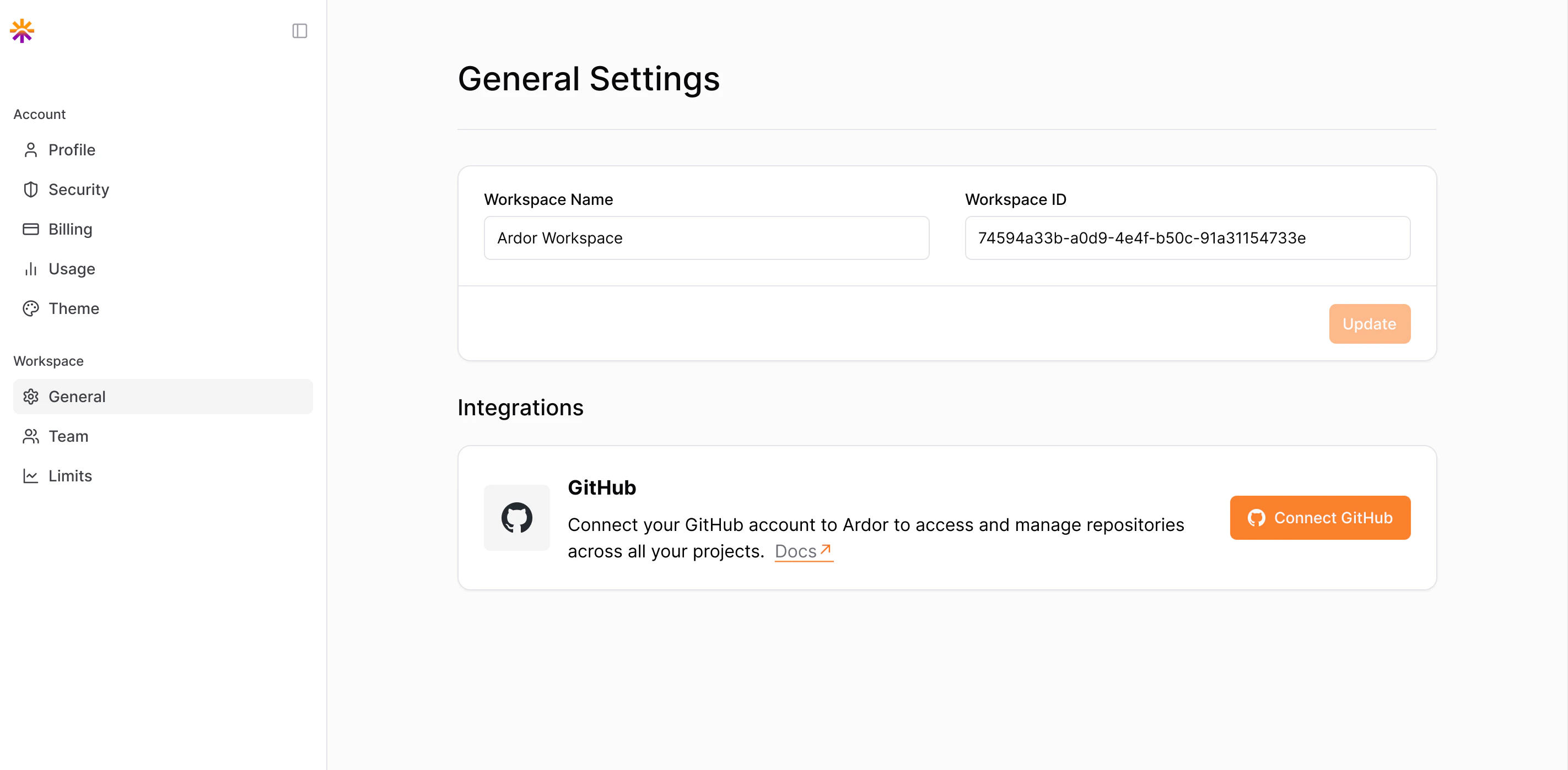
1. Go to **Workspace Settings → General → Integrations → GitHub**
2. Click **Connect GitHub**
3. Authorize Ardor to access your GitHub account
Nothing syncs yet — this step just verifies your GitHub identity.
### Step 2: Install the Ardor GitHub App
After connecting your account, install the GitHub App to grant Ardor repo access:
1. Choose where to install — personal account or organization
2. Select **All repositories** or specific ones
3. Click **Authorize Ardor**
After installation, Ardor can create repos and read code.
## Using GitHub with Ardor
Once setup is complete, you have two ways to use GitHub with your services:
Create an Ardor service from an existing GitHub repository.
### Scenario B: Export to GitHub
**Use this when:** Cerebrum built a service for you in Ardor, and you want to move the code to your own GitHub account.
## Overview
Connect your GitHub account to keep full ownership of your code. When Cerebrum builds services for you, the code lives in your repositories — you control it, you own it.
**New to GitHub?** It's a cloud platform for storing and versioning code. When you link a service to GitHub, the repo becomes the source of truth for that service's code.
## Why Connect GitHub
All code Cerebrum creates goes to your GitHub. No lock-in, full ownership.
Clone repos, use your favorite IDE, collaborate with your team via PRs.
Already have code on GitHub? Create Ardor services directly from your repos.
Push, review, and collaborate in GitHub while Ardor keeps the service connected to the repository.
**Recommended:** Connect GitHub early. It's easier to start with GitHub integration than to export later.
## Before You Connect
You need a GitHub account or organization where Ardor can access repositories.
Each service can have its own GitHub repo. A solution may contain multiple services with different repos.
A service points to a single Git repository. You can't attach multiple repos to one service.
If you rename, delete, or transfer the GitHub repo outside Ardor, syncing and deployments will break.
When exporting from Ardor to GitHub, a new repository is always created to avoid overwriting existing code.
## Setup Process
Link your GitHub identity via OAuth
Grant Ardor permission to read/create repos
Import from GitHub or export existing Ardor services
Only workspace admins can manage GitHub integration.
## Setup
### Step 1: Connect Your GitHub Account
1. Go to **Workspace Settings → General → Integrations → GitHub**
2. Click **Connect GitHub**
3. Authorize Ardor to access your GitHub account
Nothing syncs yet — this step just verifies your GitHub identity.
### Step 2: Install the Ardor GitHub App
After connecting your account, install the GitHub App to grant Ardor repo access:
1. Choose where to install — personal account or organization
2. Select **All repositories** or specific ones
3. Click **Authorize Ardor**
After installation, Ardor can create repos and read code.
## Using GitHub with Ardor
Once setup is complete, you have two ways to use GitHub with your services:
Create an Ardor service from an existing GitHub repository.
### Scenario B: Export to GitHub
**Use this when:** Cerebrum built a service for you in Ardor, and you want to move the code to your own GitHub account.
 1. Open the service
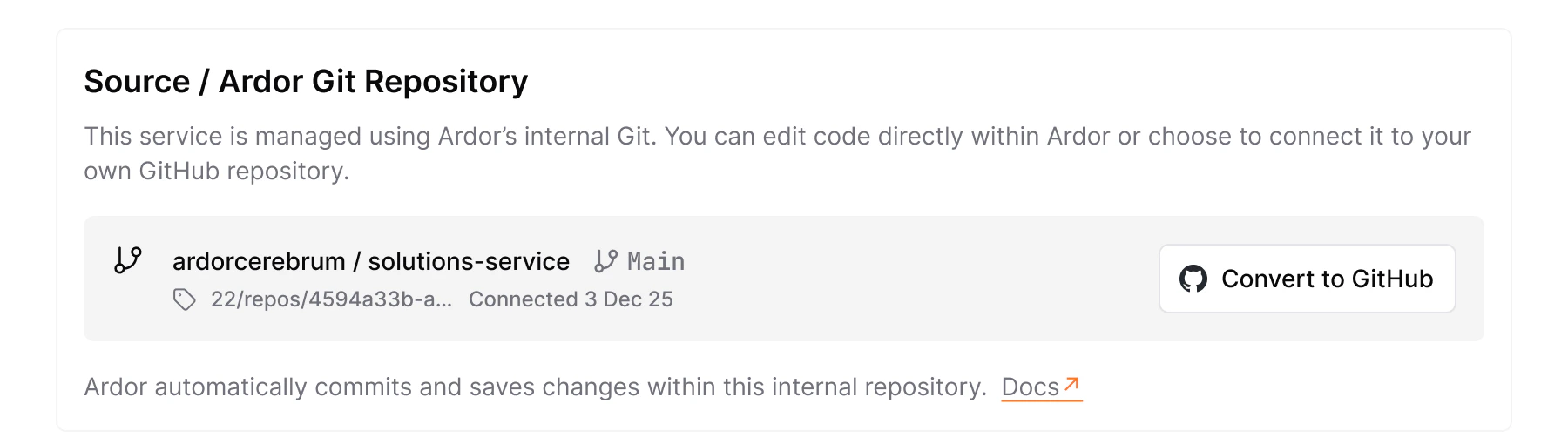
2. Go to **Settings → General**
3. Click **Convert to GitHub**
4. Confirm the transfer
Ardor creates a new GitHub repo, pushes your full commit history, and links the service to that repo going forward.
Export always creates a new repository — you can't select an existing one.
## Managing GitHub-Linked Services
Services linked to GitHub:
* Show repository details in the service settings
* Sync commits automatically
These services can't be "unlinked" — GitHub is their source of truth.
## Disconnect GitHub
To revoke Ardor's access:
1. Go to **GitHub → Settings → Applications → Installed GitHub Apps**
2. Find **Ardor** and click **Revoke Access**
After revoking, Ardor can't read or create repos. Git-backed services stop syncing until you reconnect.
1. Open the service
2. Go to **Settings → General**
3. Click **Convert to GitHub**
4. Confirm the transfer
Ardor creates a new GitHub repo, pushes your full commit history, and links the service to that repo going forward.
Export always creates a new repository — you can't select an existing one.
## Managing GitHub-Linked Services
Services linked to GitHub:
* Show repository details in the service settings
* Sync commits automatically
These services can't be "unlinked" — GitHub is their source of truth.
## Disconnect GitHub
To revoke Ardor's access:
1. Go to **GitHub → Settings → Applications → Installed GitHub Apps**
2. Find **Ardor** and click **Revoke Access**
After revoking, Ardor can't read or create repos. Git-backed services stop syncing until you reconnect.