> ## Documentation Index
> Fetch the complete documentation index at: https://docs.ardor.cloud/llms.txt
> Use this file to discover all available pages before exploring further.
# Environments
> Create isolated environments for development, staging, production, and feature work. Promote isolated code and variable changes with merge requests.
 ## Overview
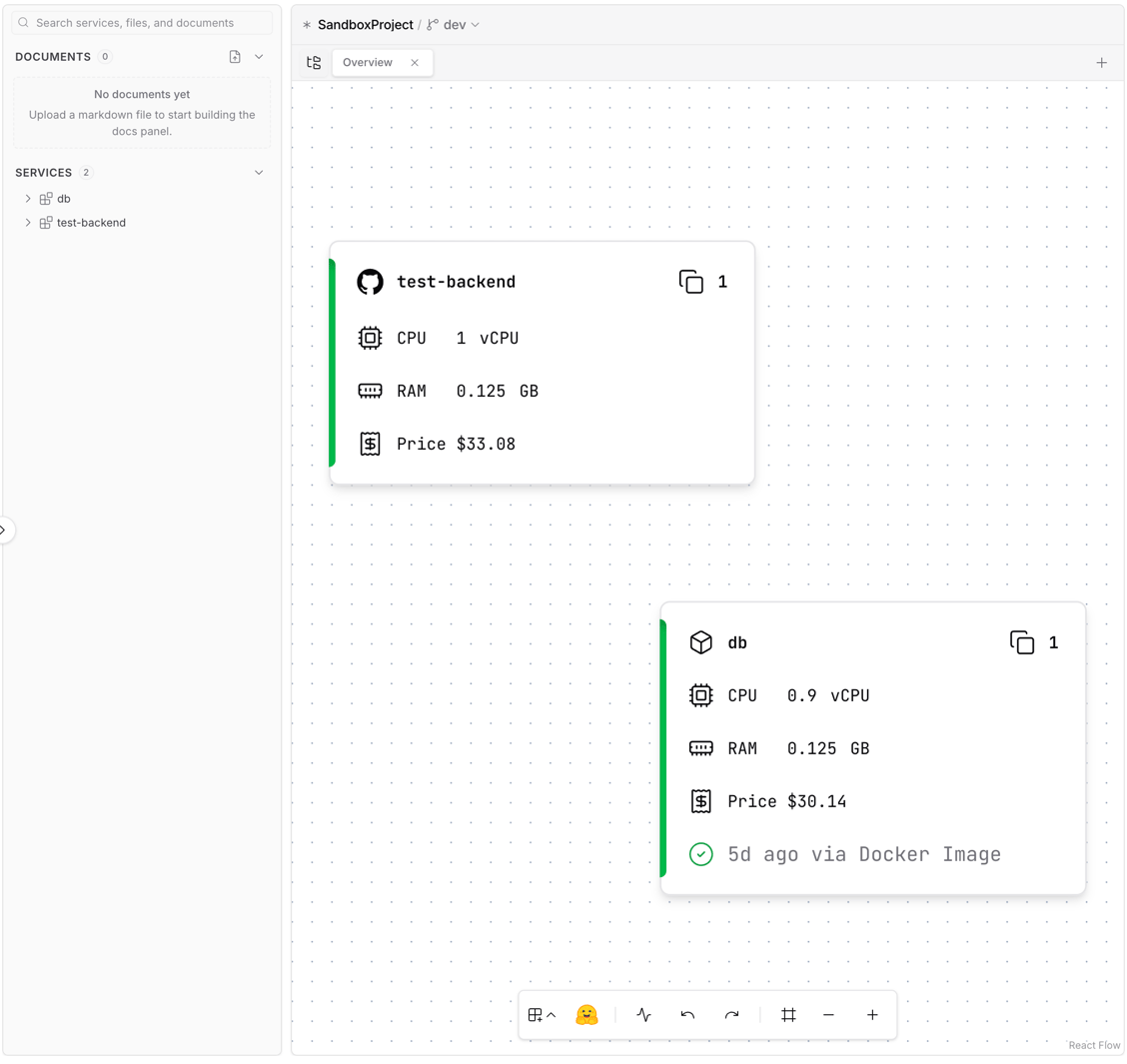
Environments let you run multiple isolated copies of your solution. Every solution starts with two environments:
| Environment | Purpose |
| ------------ | ----------------------------------- |
| `dev` | Your editable development workspace |
| `production` | Your protected live environment |
`production` is isolated from direct changes. Make changes in `dev` or another non-production environment, test them there, then apply them to another environment with a merge request.
**Cerebrum manages environments.** Just say "create a staging environment from dev" or "open a merge request from feature-auth to production" — Cerebrum will handle it. The details below explain how environments work.
**Our recommendation:** Create an environment for each feature or task you're working on, based on the environment you want to change. When the work is merged, delete the temporary environment. This keeps things clean and saves resources.
| Setup | Environments | When to use |
| -------------------- | -------------------------------- | ----------------------------------------- |
| **Default** | `dev`, `production` | Every solution starts here |
| **Per feature** | `feature-auth`, `bugfix-123` | Work on isolated changes, then merge them |
| **Classic pipeline** | `dev` → `staging` → `production` | Promote changes through validation stages |
| **Per developer** | `alice-dev`, `bob-dev` | Each dev has their own sandbox |
## Why Use Environments
Test new features, try risky changes, debug issues — without affecting production.
Developers work in editable environments, QA tests in staging, users see production. No conflicts.
Each environment can have its own resources, variables, and secrets.
Review isolated code and variable changes before applying them to another environment.
## How Environments Work
Each environment belongs to a solution. It starts as a copy of another environment, then becomes independent:
```mermaid theme={null}
flowchart LR
Dev[dev] -->|create from dev| Feature[feature-auth]
Dev -->|create from dev| Staging[staging]
Feature -->|merge request| Staging
Staging -->|merge request| Production[production]
```
When you create an environment, Ardor copies the source environment's services and settings. After that, changes in one environment do not automatically affect any other environment.
```mermaid theme={null}
flowchart LR
subgraph dev [dev]
direction LR
A1[API] ~~~ D1[(DB)]
end
subgraph feature [feature-auth]
direction LR
A2[API] ~~~ D2[(DB)]
end
subgraph prod [production]
direction LR
A3[API] ~~~ D3[(DB)]
end
dev ~~~ feature ~~~ prod
```
**What's independent per environment:**
* Services code
* Internal URLs
* Public URLs
* Environment variables and secrets
* Deployment history
Changes in code and variables stay inside the environment where you made them until you apply them to another environment with a merge request.
## Creating Environments
New environments are created from an existing environment. Ardor copies the source environment's services and settings so the new environment starts from the same shape.
Just ask Cerebrum to create an environment for you:
> "Create a new environment called `feature-auth` from `dev`"
> "Create `staging` from `production`"
Once created, you can switch between environments using the dropdown in the UI.
Environment names are flexible — use whatever makes sense for your workflow. `feature-auth`, `staging`, `alice-dev`, `experiment-v2` — whatever helps you stay organized.
## Environment Isolation
Environments are isolated after creation:
| What | Isolated? | Notes |
| ------------------- | --------- | ------------------------------------------------------------------------ |
| Services | ✅ Yes | Copied when the environment is created, then managed independently |
| Internal URLs | ✅ Yes | Different per environment |
| Public URLs | ✅ Yes | Different per environment |
| Variables & Secrets | ✅ Yes | Configure independently per environment |
| Code | ✅ Yes | Each environment has its own service code state in an environment branch |
| Data | ✅ Yes | Databases are separate |
| Logs | ✅ Yes | Each env has its own logs |
## Protected Production
`production` is protected from direct changes. This keeps the live version stable and makes production updates reviewable.
**Typical workflow:**
1. Make code or variable changes in `dev`, `staging`, or a feature environment
2. Test the changed environment
3. Open a merge request to apply the changes to `production`
4. Review and merge when ready
Other environments are editable directly. Use merge requests when you want to move changes from one environment to another.
## Code and Variables Per Environment
Each environment has its own code state, variables, and secrets. Changes stay local to that environment until merged:
| Variable | `dev` | `staging` | `production` |
| --------------- | --------------------- | --------------------- | --------------------- |
| `DEBUG` | `true` | `true` | `false` |
| `LOG_LEVEL` | `debug` | `info` | `warn` |
| `DATABASE_HOST` | `service-abc...:5432` | `service-def...:5432` | `service-ghi...:5432` |
| `API_KEY` | `test_key_xxx` | `test_key_yyy` | `live_key_zzz` |
Use merge requests to apply code and variable changes from one environment to another.
## Best Practices
Every solution includes `dev`. Make direct changes there or in feature environments, then promote reviewed changes with merge requests.
Production is protected for stable, live workloads. Apply production updates through merge requests.
Create staging or feature environments from the environment they should resemble. This keeps services, settings, and variables aligned from the start.
Same variable names across all environments. Only values differ. This keeps your code clean.
Delete feature branch environments after merging. They cost resources and add clutter.
Make it clear what each environment is for. Who uses it? What's deployed there?
## Troubleshooting
Double-check which environment is selected before deploying. The environment name is shown in the UI.
Check environment-specific variables and whether the latest changes were merged into staging. A missing, outdated, or wrong variable is the most common cause.
Environments are isolated — you can't use dev's internal URL from staging. Each environment has its own URLs.
Production is protected from direct changes. Open and merge a merge request from the environment that contains the tested changes.
## What's Next
Apply code and variable changes between environments
Configure environment-specific settings
Deploy services to different environments
Understand how services connect within environments
Learn about services and their configuration
## Overview
Environments let you run multiple isolated copies of your solution. Every solution starts with two environments:
| Environment | Purpose |
| ------------ | ----------------------------------- |
| `dev` | Your editable development workspace |
| `production` | Your protected live environment |
`production` is isolated from direct changes. Make changes in `dev` or another non-production environment, test them there, then apply them to another environment with a merge request.
**Cerebrum manages environments.** Just say "create a staging environment from dev" or "open a merge request from feature-auth to production" — Cerebrum will handle it. The details below explain how environments work.
**Our recommendation:** Create an environment for each feature or task you're working on, based on the environment you want to change. When the work is merged, delete the temporary environment. This keeps things clean and saves resources.
| Setup | Environments | When to use |
| -------------------- | -------------------------------- | ----------------------------------------- |
| **Default** | `dev`, `production` | Every solution starts here |
| **Per feature** | `feature-auth`, `bugfix-123` | Work on isolated changes, then merge them |
| **Classic pipeline** | `dev` → `staging` → `production` | Promote changes through validation stages |
| **Per developer** | `alice-dev`, `bob-dev` | Each dev has their own sandbox |
## Why Use Environments
Test new features, try risky changes, debug issues — without affecting production.
Developers work in editable environments, QA tests in staging, users see production. No conflicts.
Each environment can have its own resources, variables, and secrets.
Review isolated code and variable changes before applying them to another environment.
## How Environments Work
Each environment belongs to a solution. It starts as a copy of another environment, then becomes independent:
```mermaid theme={null}
flowchart LR
Dev[dev] -->|create from dev| Feature[feature-auth]
Dev -->|create from dev| Staging[staging]
Feature -->|merge request| Staging
Staging -->|merge request| Production[production]
```
When you create an environment, Ardor copies the source environment's services and settings. After that, changes in one environment do not automatically affect any other environment.
```mermaid theme={null}
flowchart LR
subgraph dev [dev]
direction LR
A1[API] ~~~ D1[(DB)]
end
subgraph feature [feature-auth]
direction LR
A2[API] ~~~ D2[(DB)]
end
subgraph prod [production]
direction LR
A3[API] ~~~ D3[(DB)]
end
dev ~~~ feature ~~~ prod
```
**What's independent per environment:**
* Services code
* Internal URLs
* Public URLs
* Environment variables and secrets
* Deployment history
Changes in code and variables stay inside the environment where you made them until you apply them to another environment with a merge request.
## Creating Environments
New environments are created from an existing environment. Ardor copies the source environment's services and settings so the new environment starts from the same shape.
Just ask Cerebrum to create an environment for you:
> "Create a new environment called `feature-auth` from `dev`"
> "Create `staging` from `production`"
Once created, you can switch between environments using the dropdown in the UI.
Environment names are flexible — use whatever makes sense for your workflow. `feature-auth`, `staging`, `alice-dev`, `experiment-v2` — whatever helps you stay organized.
## Environment Isolation
Environments are isolated after creation:
| What | Isolated? | Notes |
| ------------------- | --------- | ------------------------------------------------------------------------ |
| Services | ✅ Yes | Copied when the environment is created, then managed independently |
| Internal URLs | ✅ Yes | Different per environment |
| Public URLs | ✅ Yes | Different per environment |
| Variables & Secrets | ✅ Yes | Configure independently per environment |
| Code | ✅ Yes | Each environment has its own service code state in an environment branch |
| Data | ✅ Yes | Databases are separate |
| Logs | ✅ Yes | Each env has its own logs |
## Protected Production
`production` is protected from direct changes. This keeps the live version stable and makes production updates reviewable.
**Typical workflow:**
1. Make code or variable changes in `dev`, `staging`, or a feature environment
2. Test the changed environment
3. Open a merge request to apply the changes to `production`
4. Review and merge when ready
Other environments are editable directly. Use merge requests when you want to move changes from one environment to another.
## Code and Variables Per Environment
Each environment has its own code state, variables, and secrets. Changes stay local to that environment until merged:
| Variable | `dev` | `staging` | `production` |
| --------------- | --------------------- | --------------------- | --------------------- |
| `DEBUG` | `true` | `true` | `false` |
| `LOG_LEVEL` | `debug` | `info` | `warn` |
| `DATABASE_HOST` | `service-abc...:5432` | `service-def...:5432` | `service-ghi...:5432` |
| `API_KEY` | `test_key_xxx` | `test_key_yyy` | `live_key_zzz` |
Use merge requests to apply code and variable changes from one environment to another.
## Best Practices
Every solution includes `dev`. Make direct changes there or in feature environments, then promote reviewed changes with merge requests.
Production is protected for stable, live workloads. Apply production updates through merge requests.
Create staging or feature environments from the environment they should resemble. This keeps services, settings, and variables aligned from the start.
Same variable names across all environments. Only values differ. This keeps your code clean.
Delete feature branch environments after merging. They cost resources and add clutter.
Make it clear what each environment is for. Who uses it? What's deployed there?
## Troubleshooting
Double-check which environment is selected before deploying. The environment name is shown in the UI.
Check environment-specific variables and whether the latest changes were merged into staging. A missing, outdated, or wrong variable is the most common cause.
Environments are isolated — you can't use dev's internal URL from staging. Each environment has its own URLs.
Production is protected from direct changes. Open and merge a merge request from the environment that contains the tested changes.
## What's Next
Apply code and variable changes between environments
Configure environment-specific settings
Deploy services to different environments
Understand how services connect within environments
Learn about services and their configuration